OS Process Listener
Description
The OS process listener channel is an inbound channel which starts an external process executing an executable file if the channel is started. The external process then establishes an HTTP connection to Orchestra and sends messages with HTTP POST. The channel will deliver the scent data es messages within Orchestra.
This channel is used if an external system shall send messages to Orchestra and the external system doesn't support any standard protocol like HTTP.
starting and controlling the program
Orchestra will start/stop the executable program as external process.
Orchestra will configure and reconfigure the started process by sending commands over its standard input stream. Each command starts with a command name and may contain parameters separated by space. A command is terminated by a newline. After receiving and executing the command the process MUST answer with a result string on its standard output stream. If the command was successful the result string MUST start with ok. It MAY contain additional information. The following commands MUST be interpreted:
-
ping: The process must return
"ok". This command is used from Orchestra to check if the process is running. -
connect
<url>: E.g.connect http://localhost:8821/Orchestra/<scenarioid>/processlistener/<channelid>
The process establishes an HTTP 1.1 connection to the URL and performs an OPTIONS query. If the Allow header containsPOST, it answers with"ok connected to server". -
config
<parameters>: Used to send the process additional parameters. In case of WCF, this is used to set the URL of the WCF server(s).
Note that this command will be sent before thestartcommand and (if a global variable has changed) also after thestartcommand when the process is already running. -
start: The process starts processing and returns
"ok". Normally the process will start a thread which may send messages using POST over the HTTP connection to Orchestra. -
stop: The process stops processing and returns
"ok". Normally the process will stop the worker thread. -
disconnect: The process closes the HTTP connection to Orchestra.
-
exit: The process stops running.
On startup Orchestra will invoke connect, config, and start. On reconfigure Orchestra will invoke:
stop, disconnect, connect, config, and start. On stop Orchestra will invoke stop, disconnect, and exit
If a global variable is changed, config may be sent.
Processing modes
The channel supports two processing modes
-
direct execution: the program to execute is contained in an executable file.
-
interpreted execution: the program to execute is contained in a file (e.g. a jar file, or python script). This program file is processed by an interpreter which in turn is an executable file.
Finding the executable file
In direct mode as well as in interpreted mode there are different strategies to find the executable file resp. the interpreter:
-
The executable program is stored on the file system and referenced by a FileEnvironmentEntry.
-
The working directory is referenced by a FileEnvironmentEntry; the executable program is stored in a file within the working directory; the file is identified by a relative path.
-
The executable program is identified by its name; the operating system is responsible to find the executable file using its path variables.
-
The executable program to be started is stored as byte stream within the channel configuration. On startup of the channel these data are stored into a file in the working directory, the file is identified by a relative path. The working directory must be writable. After this preparation step the executable file is ready to be started. In this mode also a set of files can be saved in the channel and later restored to the working directory.
Finding the program file in interpreter mode
In interpreter mode there are two ways to specify the program to interpret (e.g. the jar file or the python script):
-
The program to execute (e.g. a jar file, or python script) is stored in the working directory; it is identified by a relative path.
-
The program to execute (e.g. a jar file, or python script) is stored as byte stream within the channel configuration; On startup of the channel these data are stored into a file in the working directory; it is identified by a relative path. The name of this file is then given as parameter to the interpreter.
Creation
To create an OS process listener follow the steps described in the general description of Adapters
Configuration
The dialog to configure the OS process listener shows different fields depending on the select of the process mode.
Depending on the selected Program start mode the configuration panel may show different fields.
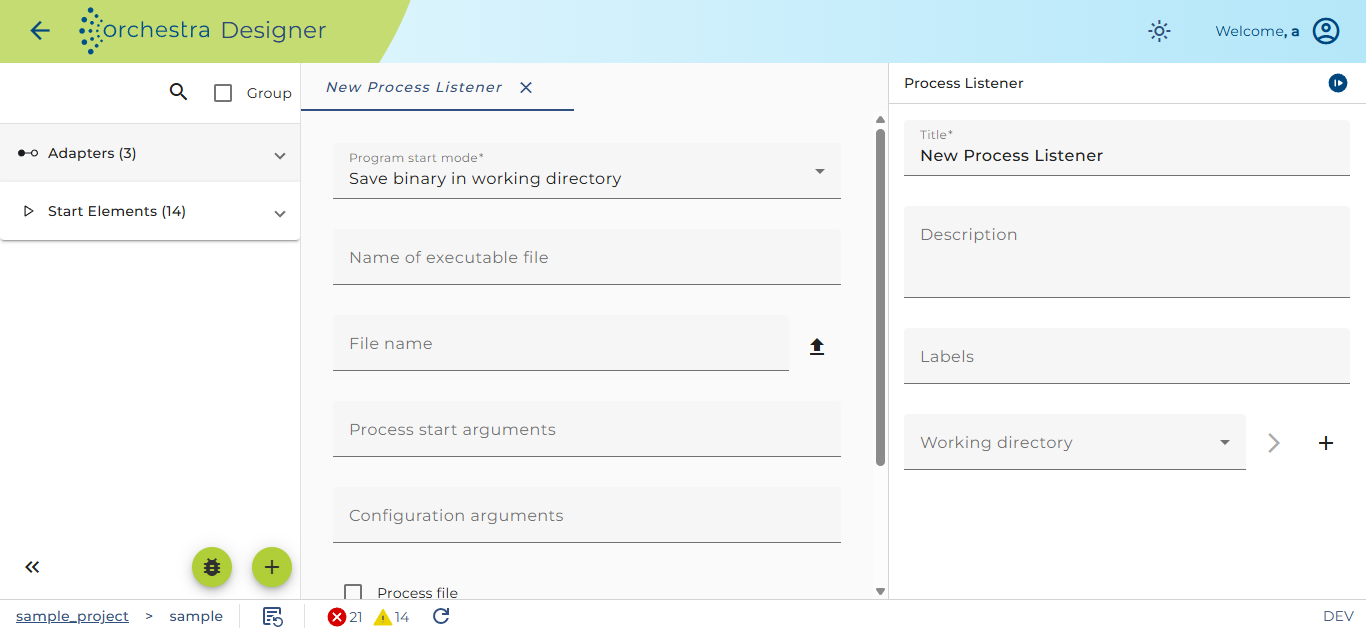
If e.g. you selected the save binary in working directory program start mode, it typically looks like:
Description
The following configuration fields exist always:
-
Working directory - Her you must select an environment entry referencing a Directory on the local file system which will server as the working directory of the started process.
-
Program start mode - here you can select one of the strategies used to find the executable file (see description above). There are four possible values to select from: operating system dependent, from working directory, from absolute path and save binary in working directory.
If the last mode is selected, a button appears which allows to select one or more files to be saved in the channel. -
Name of executable file - Here the user must enter the name of the file to be executed. If mode from absolute path is selected, this field is not editable and the value is acquired from the absolute path.
-
Process start arguments - The start arguments for the process. If the program is an Interpreter you typically set $(filename) or $(filepath). These represent the name or the path to the interpreted file; On startup they are replace be the values from the fields Name of interpreted file resp. Path to interpreted program .
-
Configuration arguments - Arguments to the config command sent to the process (see description above). The arguments can be references to landscape entries of type global variable, e.g. $(myURL)
-
Parser configuration - Here the user must configure the deserializer. The deserializer reads the byte stream sent from the process per HTTP and creates a message from it.
-
Process file - If you select this check box, the channel will work in interpreted execution mode. The following fields must be configured in this mode.
-
File start mode - here you can select one of the two strategies used to find the interpreted files. You may select from working directory or save file in working directory. As you see in the screenshot above, int the mode save file in working directory, a button appears which allows to select one or more files to be saved in the channel.
-
Name of interpreted file - Here the user must enter the name of the file to be processed.
-
Path to interpreted program - This is an information field showing the path the executable file depending on the Working directory and the Name of interpreted file.
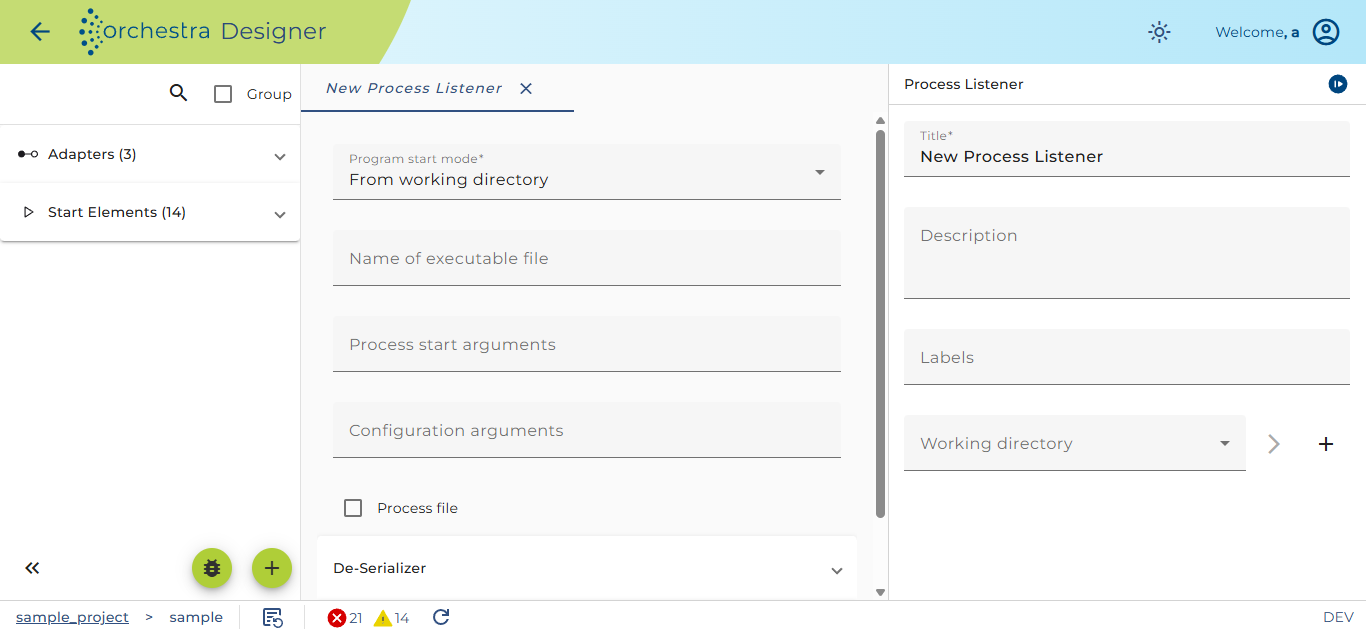
If you want to start an executable program located on the file system the configuration dialog might look like:
Description
If you select the strategy to find the executable file from absolute path the field Path to executable program appears together with a combo box to select an environment entry referencing a file path and two buttons to create or change that path.
In this example Process file is not selected, so the according configuration fields are disabled.
Usage
The channel is used if an external system shall send messages to Orchestra and the external system doesn't support any standard protocol like HTTP. Because the started process must implement a predefined command interface (as described above), the program to start is typically provided by soffico. If the customer want to develop its own program to be started from the OS process listener, soffico can provide a sample implementation of such a program.